ECA - The Power Tool in The House

Drupal Automation and Customization for Everyone

Drupal Camp Burkina Faso 2026
go.lakedrops.com/burkina-faso-2026

Jürgen Haas

29. May 2026

About myself

Member on drupal.org for almost 19 years
Maintainer of ~100 modules

Find me online:
go.lakedrops.com/jurgenhaas


Creator and maintainer


Core Subsystem Maintainer
Admin Theme


Co-founder and Managing Director

Agenda

  1. Getting Started - The “aha!” moment
  2. Going Deeper - Show the power
  3. Show the Effect - Make it real
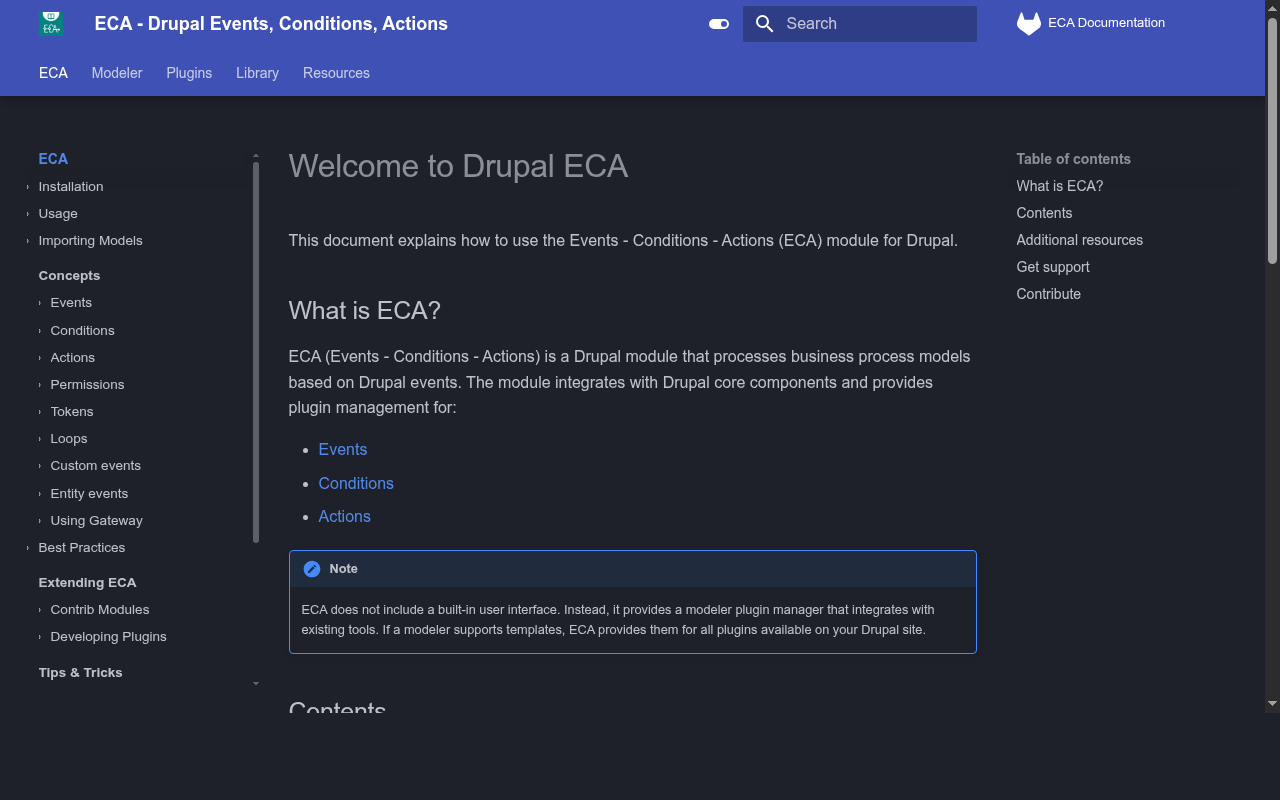
  4. Documentation - ECA Guide
  5. Plugin Reference - The toolkit
  6. ECA Ecosystem - The bigger picture
  7. Architecture & Quality - Build trust
  8. When to Use ECA - Practical guidance
  9. Complex Applications - Beyond basics
  10. Roadmap & Community - How to help
  11. Conclusion - The takeaway

go.lakedrops.com/burkina-faso-2026

Getting Started

The “aha!” moment

The scenario

You have:

  • A fresh Drupal site
  • A form you want to customize
  • An idea of what you want to happen

You need:

  • To change field labels
  • To add validation
  • To make it work differently for different users

Three approaches:

  1. Write PHP code
    The traditional way
  1. Use ECA with the visual modeler
    The technical user way
  1. Use in-context customization
    The everyone way

In-context customization

No Drupal knowledge needed

Before in-context customization:

  • Open admin menu
  • Navigate to ECA section
  • Create new model
  • Choose event
  • Configure conditions
  • Add actions
  • Save and test

With in-context customization:

  • Focus the element
  • Click the lightning bolt
  • Pick a template
  • Fill in the details
  • Save

You don’t even need to know what ECA is.

Going Deeper

What happens when you want more?

From context to modeler

Example: Role-based field labels

The use case:

You want form field labels to be different based on user role.

  • Administrators see technical field names
  • Regular users see friendly descriptions
  • Anonymous users see even simpler text

Without code: Build this in the modeler with conditions and actions.

The flow:

  1. Event: Form is being built
  2. Condition: Current user has role “administrator”?
    • Yes: Set label to “Field: user_email_address”
  3. Condition: Current user has role “authenticated”?
    • Yes: Set label to “Your email address”
  4. Else: Set label to “Email”

Visual, testable, maintainable.

Show the Effect

Make it real

Testing with different users

Debugging flow execution

See exactly what happened:

  • Which events fired
  • Which conditions evaluated true/false
  • Which actions were executed
  • What data was available at each step

Load recorded data:

  • From live production events
  • From test scenarios
  • Compare different users
  • Compare different contexts

The power:

You can answer questions like:

  • “Why didn’t this action run?”
  • “What was the user role when this happened?”
  • “What values were in the form?”
  • “Did the condition work as expected?”

All visually. All without adding debug statements to code.

Documentation: ECA Guide

Your path to independence

ecaguide.org & Library

What’s in the Guide:

  • Getting started tutorials
  • Complete plugin library with 1,000+ plugins
  • 100+ sample models you can import
  • Video tutorials and step-by-step guides

The Library: Your Starting Point

Browse working examples. See them in the standalone viewer. Export as JSON. Import into your site.

You don’t build from scratch - you adapt working examples.

Everything you need at ecaguide.org

Plugin Reference

The comprehensive toolkit

The comprehensive toolkit

Over 1,000 plugins available

~250+ Events

Entity operations, form lifecycle, user actions, cron, Commerce, Webform, custom events

~120+ Conditions

User/role checks, entity comparisons, field values, dates, complex logic (AND/OR/NOT)

~650+ Actions

Entity manipulation, field operations, email, redirects, tokens, queues, cache operations

All documented

In the ECA Guide:

  • Search by keyword
  • Filter by type and module
  • See token relationships
  • Navigate backlinks
  • Usage examples

In the Modeler:

  • Context-aware filtering
  • Only relevant plugins shown
  • Help text for every parameter
  • Token browser with drag-and-drop
  • Dependency-aware suggestions

The system guides you

The challenge:

1,000+ plugins could be overwhelming

The solution:

The system doesn’t show you 1,000 options.

It shows you the relevant 10 based on:

  • Your current context
  • Available data/tokens
  • Dependencies
  • What makes sense

ECA Ecosystem

The bigger picture

ECA Core: Lean and focused

The processor engine:

  • Plugin system (events, conditions, actions)
  • Token integration
  • Model storage & execution
  • Recording/replay infrastructure
  • Test & debug framework

Only 1 dependency:

Drupal Core

That’s it. Nothing else.

20 sub-modules: Enable what you need

Common sub-modules:

  • eca_base - Core functionality (cron, custom events, tokens, state)
  • eca_content - Entity operations (CRUD, field manipulation)
  • eca_form - Form lifecycle (build, validate, submit, alter)
  • eca_user - User events (login, logout, roles)
  • eca_views - Views integration & queries

Specialized sub-modules:

  • eca_access - Entity & field access control
  • eca_cache - Cache operations
  • eca_endpoint - Custom HTTP endpoints
  • eca_workflow - Content moderation
  • eca_queue - Async processing
  • eca_ui - Modeler interface

+ 9 more

80+ integrations

Contributed modules extending ECA:

  • AI Integration - OpenAI, local models
  • Commerce - Orders, payments, cart
  • Webform - Submission workflows
  • Flag - Flagging actions
  • Easy Email - Template-based emails
  • Group - Group operations
  • Maestro - Workflow collaboration
  • Tamper - Data transformation
  • Entity Share - Content distribution
  • + 70 more modules

The numbers

Production usage:

  • 17,000+ active installations
  • 1,000+ plugins available
  • 100+ sample models in Library
  • Active community in Drupal Slack #eca

Why it matters:

People are using this in production.

For real work. Solving real problems.

This is the most powerful automation engine in any CMS.

Architecture & Quality

Why you can trust it

The architecture

Two modelers, one system

BPMN.iO Modeler

  • BPMN 2.0 standard
  • Powerful, technical
  • Used since 2021
  • Still supported
  • For Drupal 10 & 11

Workflow Modeler (NEW)

  • React Flow-based
  • Modern, accessible
  • Context-aware
  • Test/replay/debug built-in
  • Requires Drupal 11.3+

Modeler quality

The new Workflow Modeler:

  • 3,617 test cases, 5,571 assertions
  • 1.9x more test code than production code
  • 15 CI gates, zero tolerance
  • PHPStan level 6, TypeScript strict
  • 3 test layers: unit, E2E, accessibility
  • WCAG AA compliant
  • 35 component stories audited
  • This is production-grade engineering.

ECA quality & support

ECA Core:

  • High test coverage
  • Active maintenance since 2021
  • Regular updates
  • Stable API, backward compatible
  • Over 17,000 production installations

Platform support:

  • Drupal 11.3+
    full features, new Modeler - PHP 8.3+
  • Drupal 10
    supported, BPMN modeler - PHP 8.1+
  • Drupal 12
    ready - coming late 2026 - PHP 8.5+

  • Config entities:
    sync, version control, deployment

Built for extensibility

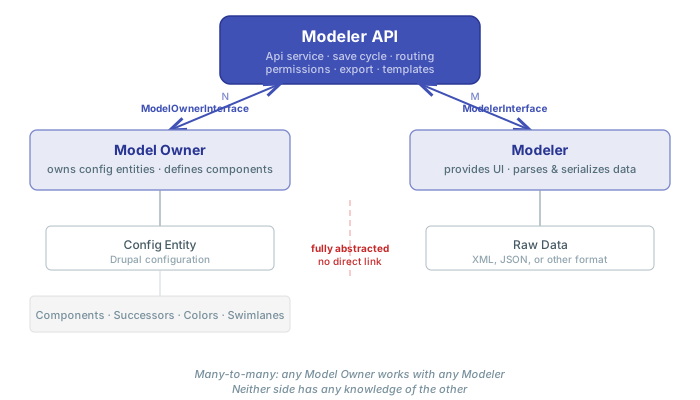
Modeler API:

  • Build custom modelers
  • Create templates
  • Context & dependency systems
  • Test/replay/debug framework

ECA Plugin APIs:

  • Custom events, conditions, actions
  • Token integration
  • State & variable systems
  • Integrate external systems

When to Use ECA

Practical guidance

ECA vs. Custom Code

Should I write custom code or use ECA?

Answer: Use ECA.

Why?

  • Faster to build
  • Visual and testable
  • Maintainable by non-developers
  • Transparent to clients
  • Config entities (easy deployment)
  • No code to maintain
  • Documented by its own structure

When to write custom code instead:

  • Complex algorithms (math-heavy, performance-critical)
  • Deep Drupal core integration
  • Something that needs to be a reusable API for other modules

Everything else? ECA.

Site-specific logic. Form alterations. Redirects. Notifications. Validation. Entity manipulation.

All better in ECA.

ECA vs. Other Modules

Should I install a module or build with ECA?

Answer: Use ECA.

Why?

  • One system instead of many modules
  • Fewer dependencies to maintain
  • Fewer updates to track
  • Custom logic exactly matching your needs
  • No bloat (modules do 80% of what you want, ECA does 100%)
  • Transparent logic

When to use a module instead:

  • Complex UI components (the module provides a whole admin interface)
  • Established, well-maintained solutions (don’t reinvent the wheel)
  • Something you’ll use across many sites (recipes can help here too)

But consider:

Many modules can be replaced by a single ECA model.

Redirect modules? ECA can do it. Login redirect modules? ECA can do it. Notification modules? ECA can do it.

Fewer modules = simpler site.

Complex Applications

Beyond the basics

What ECA can do

Application development, not just automation:

Page rendering:

  • Custom page layouts
  • Dynamic block placement
  • Themed output
  • Context-aware displays

Form building:

  • Multi-step wizards
  • Dynamic AJAX interactions
  • Custom validation
  • Conditional fields

API endpoints:

  • RESTful APIs
  • Webhooks
  • AJAX handlers
  • External integrations

System integration:

  • Maestro multi-user workflows
  • FlowDrop orchestration
  • External API calls
  • Event-driven architecture

Production example: SAP Frontend

Built almost entirely with ECA:

Scale:

  • 30-40 user roles
  • 25 node types
  • 20 taxonomies
  • 18 workflow states
  • Hundreds of ECA models

Capabilities:

  • Complex validation rules
  • Access control across entity references
  • Automated reporting
  • Multi-step approval workflows
  • Integration with SAP backend

Serving a global enterprise.

Production example: Booking System

Built entirely with ECA - zero custom code:

Features:

  • Calendar display
  • Availability checking
  • Reservation management
  • Customer management
  • Contract generation

Automation:

  • Multilingual email notifications
  • Cron-based reminders
  • Payment tracking
  • Reporting dashboards
  • Multi-currency support

Serving real customers, real bookings.

Roadmap & Community

Where we’re going and how you can help

What’s coming

The roadmap:

Developer experience:

  • Htmx integration for reactive UIs
  • More in-context customization:
    entities, views, login
  • Sophisticated gateways and loops
  • Improved custom events to build reusable models
  • Visual debugging improvements

Community & content:

  • Enhanced AI agent integration
  • More Library templates
  • Community plugin repository
  • Documentation expansion

Community-driven. Prioritized by real needs.

How you can help

Share your knowledge:

  • Build templates - share your workflows
  • Write documentation - tutorials, videos, guides
  • Spread the word - share success stories

Define intelligence:

  • Context - which plugins make sense where?
  • Dependencies - what should follow what?

Make it better:

  • Test and report - find edge cases, report bugs
  • Request features - what would help you?
  • Help others - answer questions in Slack

Not a coder? No problem.

Use ECA, share feedback, help others. Your perspective matters.

Getting started

Install the ECA Starterkit recipe on a Drupal 11.3+ site:

Quick setup:

# Install the recipe
composer require drupal/eca_starterkit

# Apply it to your site
drush recipe ../recipes/eca_starterkit

That’s it. You’re ready.

What you get:

  • ECA Core + essential sub-modules
  • Workflow Modeler
  • Sample models from the Library
  • Working examples you can explore
  • Everything configured, ready to use

Start exploring immediately.

Conclusion

ECA brings Drupal power to everyone.

Not just developers. Not just technical users. Everyone.

  • In-context customization for end users
  • Visual modeling for site builders
  • Extensible architecture for developers
  • AI integration for the future
  • Production-ready with 17,000+ installations

The power tool is in your house. It’s time to use it.

Q&A