
For Everyone: In-Context Customization Without the Learning Curve
No matter how good the modeler, not everyone can use it.
That was the insight that changed our UX strategy. We'd built something powerful - the Modeler API, the new Workflow Modeler, comprehensive testing infrastructure. All working beautifully for developers and technical site builders who understand events, conditions, loops, and tokens.
But what about content editors who've never encountered those concepts? Site builders skilled in their domain but unfamiliar with event-driven architecture? People whose expertise lies elsewhere?
They don't lack the desire to build automation. They lack the prerequisite vocabulary.
The breakthrough: bring ECA to where users already are, without requiring them to learn our language first.
The Lightning Bolt
You're editing a form. Contact form, user registration, content submission - doesn't matter. Next to each field that has applicable templates, there's a small lightning bolt icon.
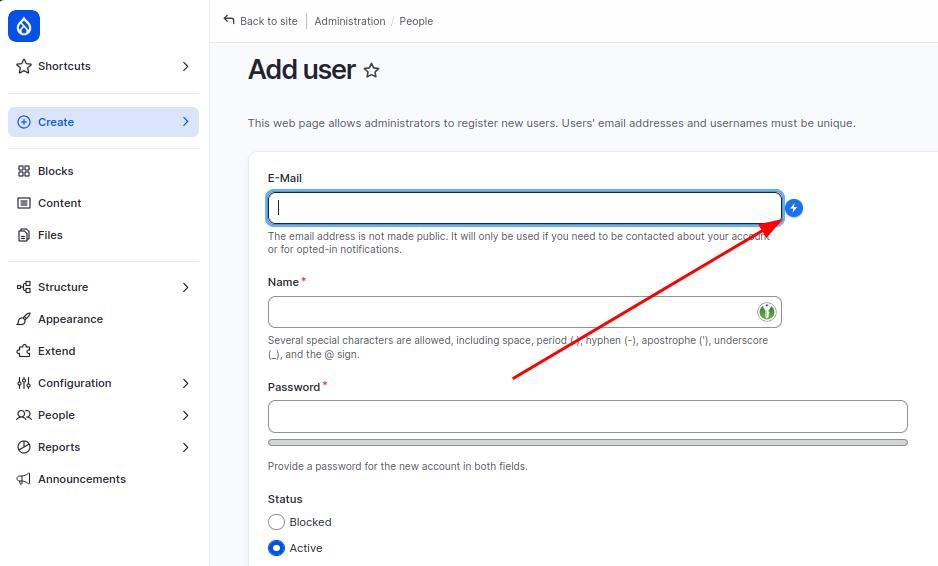
Click it. A menu opens. Inside: templates for that specific field.
"Set default value based on user role"
"Change field label for anonymous users"
"Add custom validation rule"
"Hide field if condition is met"
Pick one. Fill in the configuration fields - default value, custom label, validation message. Click apply.
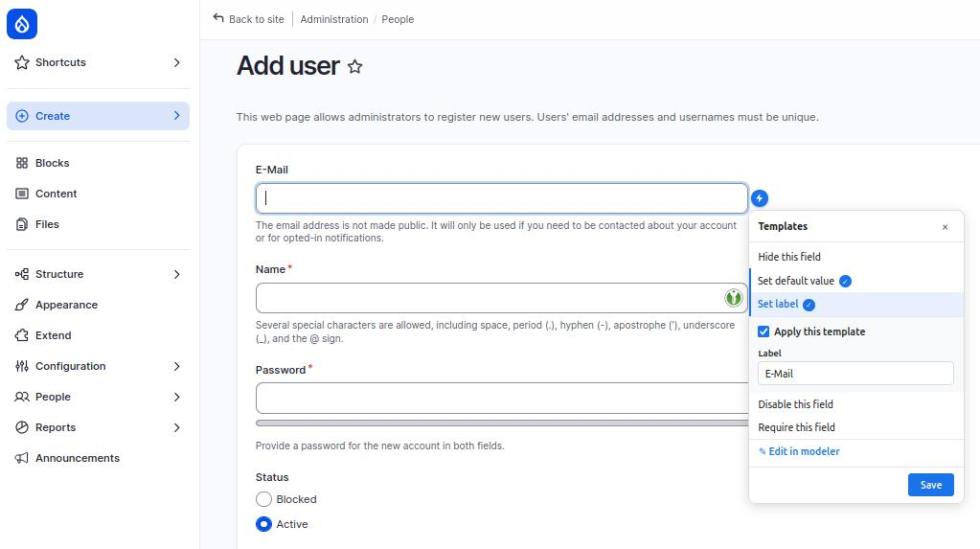
Done. You just built automation without visiting a configuration screen. Without knowing what ECA models are. Without learning BPMN or event-driven architecture.
The power came to you.
How It Works
The in-context interface does three things:
1. Templates
Pre-built automation patterns created by technical users. A template is just an ECA model, flagged as a template. Everything else is what ECA users already know - events, conditions, actions. Each template defines what it does, what parameters it needs, and where it can be used.
2. Context Awareness
The system knows where you are. Form editing interface? Show form-related templates. Node editing? Show content-related templates. Context determines what's relevant.
3. Token Resolution
Parameters use tokens - placeholders that resolve to actual values. Form ID, field names, content types. Users see friendly dropdowns, not token syntax.
The result: automation that feels like configuration. And because templates are just ECA models, any technical user can build more. The scope of what's configurable this way expands with every template added.
A Concrete Example
You manage a Drupal site. Someone submits the contact form, and you want an email notification.
Traditional approach:
- Install notification module
- Navigate to its configuration
- Learn its interface
- Configure triggers, conditions, actions across multiple screens
- Debug why it's not working
- Eventually succeed
In-context approach:
- Edit the contact form
- Click lightning bolt, select "Send email notification", enter recipient
- Save
Six steps become two. Configuration screens become contextual menus. Learning curve becomes almost flat.
For Non-Technical Users
This is the feature I'm most excited about.
Years of feedback from site builders: "ECA is powerful but I don't know where to start." "Can someone just show me the three things I actually need?" "Why do I have to learn all this architecture to send an email?"
In-context customization answers those questions by not requiring them.
You don't need to know what ECA models are, how events trigger, or where configuration lives in Drupal's admin.
You need to know where your form is, what you want to happen, and how to fill in three fields.
The abstraction layer handles everything else.
For Technical Users
But what if you are a technical user? What if you want the full modeler, not just templates?
Click the lightning bolt. Notice the "Edit in modeler" link at the bottom of the menu.
Click it. The full Workflow Modeler opens - with the form context already pre-filled. Form ID populated. Event already selected. You start from context, not from blank canvas.
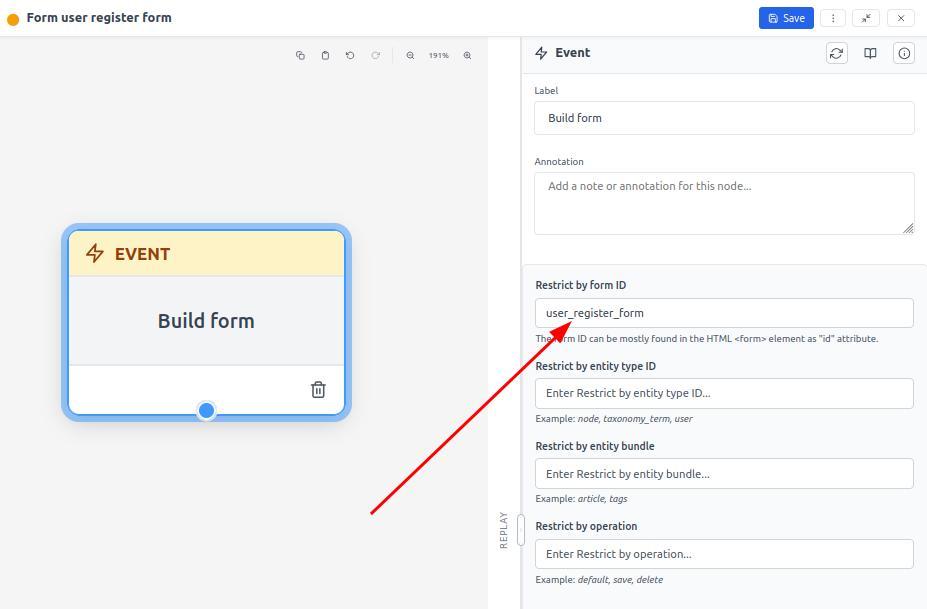
And every ECA model created through in-context customization can be opened in the modeler later. Edit it. Enhance it. Extend it like any other ECA model. It's a quick-start approach. Many ECA experts report this helps them start new tasks much faster - template provides scaffolding, modeler adds sophistication.
This is the transition ramp. Start in-context. Graduate to full modeler. Learn by doing, not by reading documentation first.
Building Templates
The system is only as useful as its template library.
Templates are ECA models with special template tokens. Mark a model as a template, and an additional token set appears - defining selection criteria (where it applies), input arguments, and context-specific values. These work like any other tokens: visible in Replay Panel, expandable, draggable into configuration fields.
When a user applies a template, the system clones the base model, replaces template tokens with user-provided values, and saves it as a new ECA model. The user sees simplified configuration. Behind the scenes: complete automation model.
Build it once. Apply it dozens of times across dozens of contexts.
This is the force multiplier pattern.
Current State and Roadmap
Available now:
- In-context customization for forms
- Template system infrastructure
- Direct access to full modeler from context
- Token resolution for form-related automation
Planned:
- Login/logout scenarios
- Redirect management
- Content rendering customization
- Commerce checkout workflows
- View display modifications
Each expansion requires:
- Context detection logic
- Template libraries specific to that domain
- UI integration points
- Testing across different scenarios
UX research with Emma Horrell and Mark Dodgson shaped this interface. User testing confirmed: people who'd never used ECA before could successfully apply templates.
That's the bar: first-time users succeeding without documentation.
Why This Matters to Drupal
Simpler CMSes have a pattern: install plugin, configure in two minutes, done. No architecture to learn. No deep technical concepts. Just point, click, working feature. WordPress, Wix, Squarespace - they excel at this.
Drupal's strength: power, flexibility, enterprise capabilities. But that power comes with complexity.
In-context customization bridges this gap. Keep the power. Remove the mandatory learning curve. Let users grow into complexity when ready, not before.
This is "low-code Drupal" as reality, not marketing term. Non-technical users building automation that works. Developers creating template libraries that empower teams.
For Agencies and Teams
The agency use case is compelling.
Build a template library for common client needs:
- Form submission workflows
- User registration automations
- Content publication notifications
- Commerce order processing
Install it on every client site. Train clients: "See the lightning bolt? Templates are there. Use them."
Features built this way feel like Drupal out-of-the-box from a user's perspective. The lightning bolt is native UI. The templates appear contextually. The configuration feels integrated. But you're not waiting for Drupal core release cycles. You're accelerating feature delivery without compromising quality, structure, or scalability.
Result:
- Reduced support tickets ("Can you make this form email us?")
- Faster client delivery (template libraries as reusable assets)
- Client empowerment (self-service customization)
- Differentiation ("Our sites let you customize without us")
- Core-quality UX without core development timelines
Template libraries become competitive advantage.
The Template Marketplace Vision
Looking three years ahead: what if there's a marketplace?
Community-contributed templates. Rated, reviewed, maintained. "Top 50 form automation templates." "Essential Commerce ECA patterns." "Enterprise user management workflows."
One-click install. Apply to your context. Customize parameters. Working automation in minutes.
This doesn't exist yet. But the infrastructure is ready. The Template system can load from anywhere - local modules, remote repositories, marketplace APIs.
The foundation is built. The community builds the library.
Real-World Scenario
A university website. 40 departments. Each has contact forms, event registrations, newsletter signups.
Old way:
- Central IT builds everything
- Every customization is a ticket
- Six-week backlog for "simple" changes
- Departments frustrated by slow response
New way with in-context customization:
- Central IT builds template library (once)
- Department web managers apply templates (self-service)
- Customizations happen immediately
- IT supports template library, not individual implementations
The organizational impact: developers become force multipliers. One template serves dozens of use cases across dozens of departments.
Building Your Template Library
If you're a developer, here's where to start:
1. Identify Patterns
What do you build repeatedly? Form notifications? User redirects? Content updates? Those are template candidates.
2. Extract Parameters
What varies each time? Email addresses? URLs? Content types? Mark those as parameters.
3. Declare Context
Where should this template appear? Form editing? Node types? User pages? Use template tokens to declare where it applies.
4. Write Help Text
Users need guidance. What does each parameter do? What are good defaults? Provide clear labels.
5. Test with Non-Technical Users
Can someone who's never seen ECA apply your template successfully? If not, simplify.
The investment: a few hours per template.
The return: that template used dozens or hundreds of times, by people who couldn't build it themselves.
What This Enables
This isn't just about making ECA easier. It's about changing who can build automation and customize Drupal sites.
Content editors who manage pages, not configuration.
Site builders who know Drupal basics, not architecture.
Department managers who understand their workflows, not PHP.
Students learning Drupal for the first time.
Automation becomes accessible. Customization becomes approachable. Complexity becomes optional.
That's the goal: you don't think "I'm using ECA." You think "I just customized that form." The technology disappears into the workflow.
Join Us
Try in-context customization on forms. Enable the eca_form submodule - it includes a predefined template that we use in all slides and demos. Build templates for your common use cases. Share what works.
We're building the template library together. Your patterns benefit the community. The community's patterns benefit you.
Join us in Drupal Slack #eca-next-gen, comment below, or reach out via our contact form.
Add new comment