
Six Small ECA Models That Make Drupal Editors Happy
Content editors rarely ask for a workflow engine. They ask why Drupal cannot suggest a title, keep three selects consistent, or show an edit link where they actually work.
Fair question.
Those requests often become a custom module, a ticket, a sprint, and then a small thing nobody touches again because it lives in a corner of the code base. The new ECA Guide library models show another route. Not magic. Just small, visible improvements at the exact point where people edit content.
Six new ECA Guide recipes are now available. They are deliberately narrow. That is their strength. Each is a well-architected starting point, not a production solution to apply blindly. Together, they make a useful point: ECA can turn the annoying gaps between Drupal's good building blocks into a better editing experience.
Small friction accumulates
An editor opens an Article form hundreds of times a year. One unnecessary page reload, one stale city selection, one missing shortcut, or one repeated byline does not look serious in isolation.
It is serious when repeated by a content team.
The cost is not only minutes. It is interrupted attention, inconsistent content, and the familiar feeling that the CMS is working against its own users. Editors stop asking for improvements when every small request sounds expensive. Organisations then accept bad habits as process.
ECA is useful here because it connects Drupal events, conditions, and actions without making every variation a bespoke PHP project. The model remains configuration. A technical user can inspect it, adapt it, review it, and ship it with the site.
The library models do not claim to know every editorial process. They show where the handles are.
Six examples, six moments of relief
1. Let the first save do the boring analysis
Recipe 0038 reacts when an Article is first saved. If the editor left the summary empty, one structured AI response can provide a summary, SEO description, reading time, sentiment, and three to six keywords. The keywords become reused or new taxonomy terms. Negative sentiment also removes front-page promotion.
For the editor, this means a useful first draft of the housekeeping around an article, while a manually written summary stays untouched. For an organisation, it can improve metadata consistency and reduce the pile of tiny follow-up tasks that otherwise appears before publication.
The model does not outsource editorial judgement. It runs before save, avoids recursive saving, logs invalid output, and leaves the editor's own summary alone. Somebody still needs to read the result. AI can produce structured data. It cannot guarantee factual accuracy, suitable tone, or an acceptable privacy decision.
This is also the model with the biggest production questions: synchronous latency, provider cost, privacy, data residency, and review policy. Its Article display changes need review as well. I would treat this as a careful pilot, not as a checkbox with a nice logo.
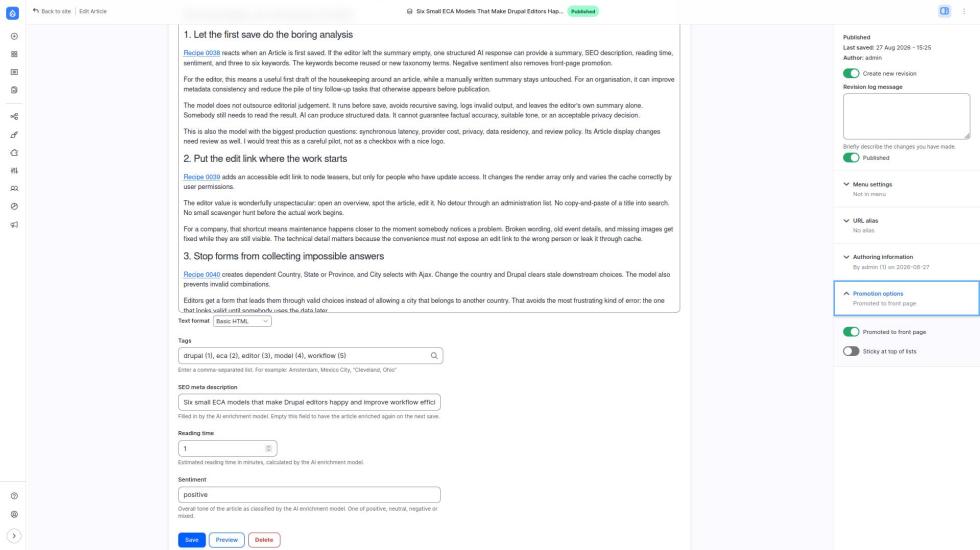
One first-save response can prepare metadata, but the editor remains responsible for the result.
2. Put the edit link where the work starts
Recipe 0039 adds an accessible edit link to node teasers, but only for people who have update access. It changes the render array only and varies the cache correctly by user permissions.
The editor value is wonderfully unspectacular: open an overview, spot the article, edit it. No detour through an administration list. No copy-and-paste of a title into search. No small scavenger hunt before the actual work begins.
For a company, that shortcut means maintenance happens closer to the moment somebody notices a problem. Broken wording, old event details, and missing images get fixed while they are still visible. The technical detail matters because the convenience must not expose an edit link to the wrong person or leak it through cache.
3. Stop forms from collecting impossible answers
Recipe 0040 creates dependent Country, State or Province, and City selects with Ajax. Change the country and Drupal clears stale downstream choices. The model also prevents invalid combinations.
Editors get a form that leads them through valid choices instead of allowing a city that belongs to another country. That avoids the most frustrating kind of error: the one that looks valid until somebody uses the data later.
For an organisation, cleaner data means fewer repairs, better filtering, and less reporting nonsense. It is a small guardrail with a long tail.
The demo data is hardcoded. That is correct for a library example and wrong for most real sites. Replace it with managed data and define who owns that data before calling this finished.
4. Give one field a useful button
Recipe 0041 adds Field Widget Actions beside Article fields. Suggest a title offers three choices. Insert byline fills one attached field. There is no AI involved, which may disappoint a few people and calm everybody else.
For the editor, the help appears beside the field that needs it. No modal, no separate tool, no saving a half-finished node. A choice stays a choice.
For an organisation, this pattern makes house style easier to follow without turning the form into a training course. It also offers a cheap place to test recurring editorial assistance before commissioning a larger workflow.
Its boundary is useful: a Field Widget Action changes one attached field. If the requirement needs several fields, use the next pattern instead.
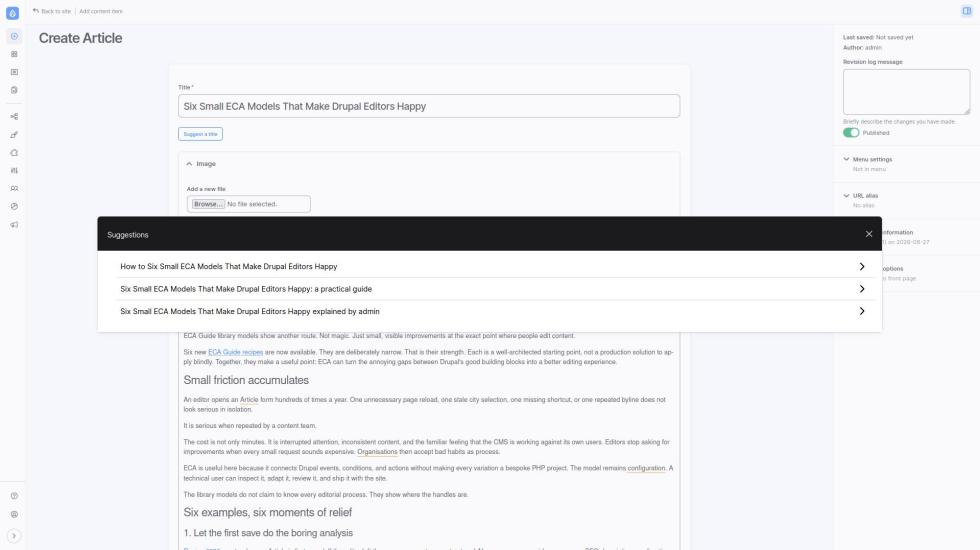
Field Widget Actions keep a small editorial helper beside the field it changes.
5. Update several fields without saving the node
Recipe 0042 adds a Topic selector and a Generate draft button with Form API Ajax. It fills the title, body summary, and body without reloading the page or saving the node.
That distinction is not academic. The editor can inspect, change, or discard the generated draft before the normal Save action does anything. The button validates only the Topic field. Ordinary saving keeps Drupal's usual validation.
The editor gets a quick starting point rather than a surprise publication. The organisation keeps its existing review and publishing process intact. Again, no AI here despite the button name. The model demonstrates a form interaction pattern, not an artificial author with questionable taste.
6. Put advice beside the form, not inside the editor's head
Recipe 0043 puts an HTMX button on the form. It fetches a writing-tips fragment from an ECA endpoint and swaps that markup into the page.
The editor receives contextual guidance when it is useful. A short explanation of the site's writing rules can sit beside the body field instead of in a PDF that only gets opened after somebody complains.
For an organisation, this makes guidance maintainable and timely. Editorial standards become part of the work surface. The endpoint needs appropriate access control, of course.
HTMX has a clear boundary here. It makes an HTTP request and swaps markup. It does not submit, validate, rebuild, save, or change Drupal form state. That makes it excellent for advice and unsuitable for safely managing a form's values.
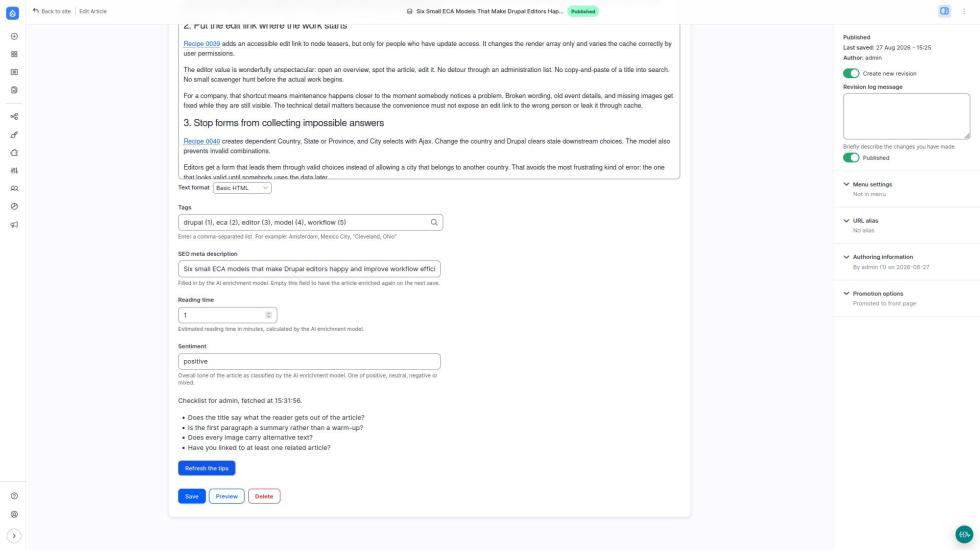
An HTMX endpoint can place guidance in context without submitting or saving the form.
Three buttons, one decision rule
These examples are easier to adapt when the boundary is clear:
| If you want to... | Start with... | Why |
|---|---|---|
| Change one attached field | Field Widget Action | The action belongs beside that field. |
| Change several Drupal form fields | Form API Ajax | Ajax participates in Drupal's form lifecycle and can update form state. |
| Show content beside a form | HTMX endpoint | HTMX fetches and swaps markup without pretending to manage form state. |
This is the part that saves time. Do not use HTMX as a faster Ajax. They solve different problems. Choose the smallest mechanism that honestly fits the interaction.
The architecture is the value after the demo
Across the six models, there are 11 event nodes, 24 conditions, 50 action nodes, and one bounded-loop gateway. They touch content, forms, rendering, access, endpoints, HTMX, logging, token lists, taxonomy, Tamper, AI Integration, and Field Widget Actions.
That is not a shopping list. It is proof that the ecosystem's pieces can meet at the editor's desk.
The models show a pattern I would like more Drupal sites to use: start with a concrete irritation, model the smallest safe response, then let editors react to it. A title helper can remain a title helper. Contextual tips do not need to become a custom editorial platform. Small models are easier to understand, test, replace, and hand over.
For agencies and internal teams, this changes the economics of refinement. Instead of collecting tiny UX requests until a development budget appears, they can evaluate a working model, adapt it to their fields and rules, and make a considered decision. Some will still need custom code. But now the request begins with a map, not a blank page.
If you want more context on form work, I wrote earlier about modifying forms with ECA. The wider argument is in ECA brings great value to Drupal CMS, and the Modeler API explains why reusable visual models matter beyond ECA itself.
Start with the irritation everybody already knows
I would not install all six recipes just because they exist. That would be a very Drupal answer to a very human problem.
Pick one repeated editor complaint. Map the desired moment. Decide whether it changes one field, several fields, or only nearby guidance. Then start from the corresponding recipe, replace its demo assumptions, review permissions and validation, and test it with the people who edit every day.
That is when ECA becomes visible. Not as a diagram editor. As a CMS that stops wasting people's attention.
The six recipes are available as 0038, 0039, 0040, 0041, 0042, and 0043. Try one. Then tell us which small irritation you would remove next in the Drupal Slack ECA channel, in the comments below, or through our contact form.
Add new comment