Test, Replay, Debug: Closing the Feedback Loop
I've been building workflows blind for years. Configure a model, save it, deploy, trigger an event, check logs, guess what went wrong. Repeat. Slow, frustrating, error-prone.
When we talked to existing ECA users during UX research in late 2025, they didn't ask for more actions or events. They asked for visibility. "This is what we've waited for the most," they said.
Early 2026, we built it. Integrated test, replay, and debug in the modeler. Trigger events, record executions, step through playback, inspect token values.
No other workflow tool in any CMS does this. Not WordPress, not Joomla, not n8n or Zapier at this level.
The Pain
You build a workflow. "When a form is submitted, send an email to the admin."
Configure the event. Add the action. Fill in the token. Save.
Does it work? You don't know until you trigger it.
Submit the test form. Wait. Check email. Nothing. Check logs. Error: undefined token. Back to the modeler. You used [form_data:email] instead of [event:form_data:email].
Fix it. Save. Test again. Works. Thirty minutes for one character.
Complex workflow: twenty nodes, five branches, token references between steps, multiple events.
How do you test that? You can't see execution flow. Can't inspect token values mid-execution. Can't replay production failures. Building blind.
Existing ECA users: "Give us visibility."
What Users Requested
UX research sessions in late 2025 with Emma Horrell and Mark Dodgson. We asked experienced ECA users: "What do you need most?"
"Let me test before deploying." See what happened directly in the modeler, not through logs.
"Show me what tokens are available." Actual data at each step, not guesswork or documentation.
"Let me debug production issues." Replay with the real data that caused the failure.
"Help me understand complex workflows visually." I can read structure, but I don't understand flow until I see execution.
Same underlying need: close the feedback loop.
The Solution
Three integrated capabilities in the Workflow Modeler:
- Live testing - Modeler listens, you trigger an event, see execution results immediately
- Execution replay - Record events, replay step-by-step with playback controls
- Token inspection - See actual token values at each step
No separate tools. No context switching. Build, test, debug - same interface.
Live Testing
Building a workflow. Want to test it.
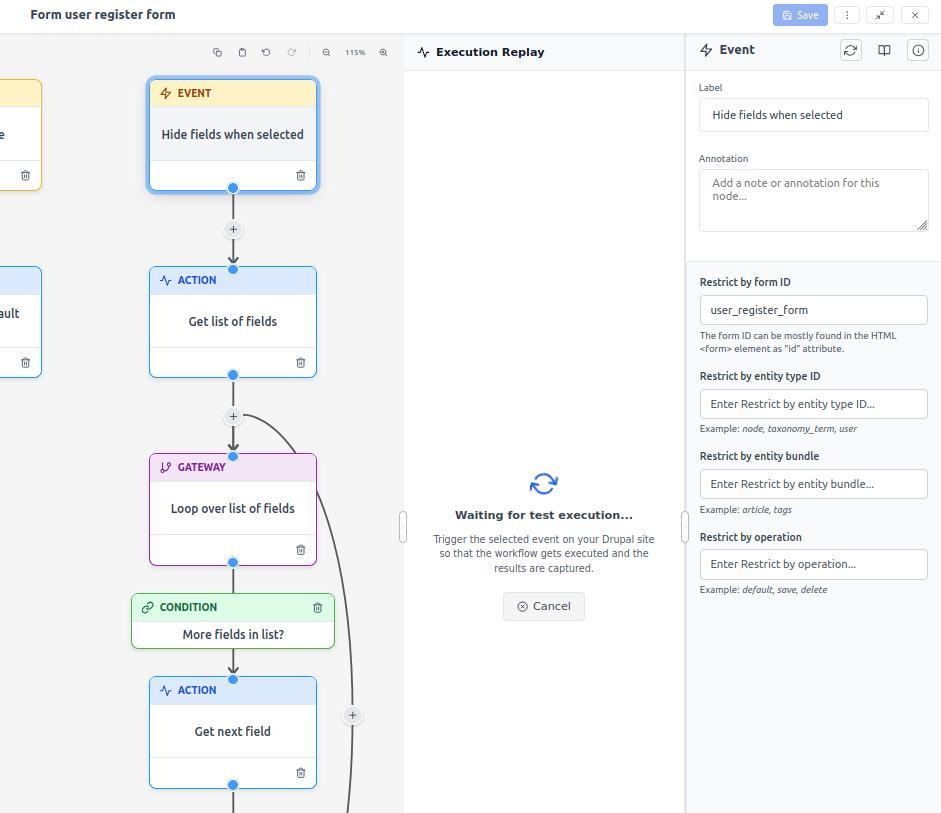
Click "Test" in the modeler toolbar. The modeler enters listening mode. Trigger the event - submit a form, create content, whatever.
When ECA processes it, the modeler automatically loads execution data.
You see:
- Execution path through conditional branches
- Successful nodes (green highlight)
- Failed nodes (red highlight with error)
- Loop iterations with different conditions
- Token data at each step
No deploy waiting, no log hunting.
Found a problem? Fix it. Test again. Iterate fast.
Development workflow changes: "build → deploy → hope → debug" becomes "build → test → fix → deploy with confidence."
Execution Replay
Live testing works for development. Production issues need replay.
Customer reports: "When I purchase product X with coupon Y, the workflow fails."
Can't reproduce it. Different data, different state. With replay, you can.
Recording: System records full event context - all token values, all state, everything the workflow sees. Stored in the database.
Replay: Open the modeler from any client. Load the recorded execution. Click "Replay."
Watch the exact execution that happened. Same data, tokens, conditions. Step through with full visibility.
Playback controls: Play/pause, step forward/back, speed adjustment, jump to node.
As you step through:
- Nodes highlight as they execute
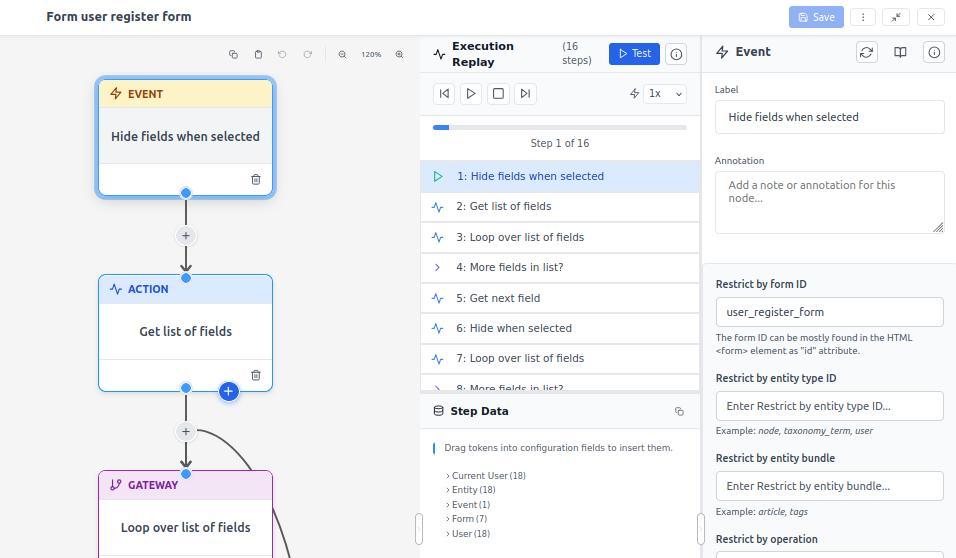
- Token values update in inspection panel
- Branches show which path and why
- Errors display with full context
See exactly where and why it failed. With actual data.
Eliminates "can't reproduce" debugging. Happened on the server? Replay from any browser.
Caution: Recording is expensive. Full context capture requires significant CPU and storage. We've optimized heavily - 70% CPU savings one round, 85% storage savings another. But it's still resource-intensive.
Don't enable permanently on production. Use temporarily when debugging, then disable. Diagnostic tool, not monitoring system.
Token Inspection
Tokens are powerful but abstract. [event:user:mail] makes sense when you know what it resolves to. During development, you're guessing.
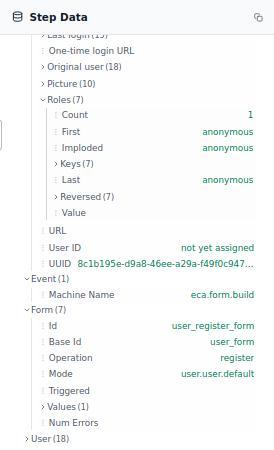
Token inspection shows actual values. During testing or replay, a panel displays:
- Available tokens at current step
- Resolved values
- Data types
- Empty, null, or undefined status
Example at a "Send email" action:
[event:user:mail]: "admin@example.com"
[event:form_data:subject]: "Contact form submission"
[event:form_data:message]: "I have a question about..."
[event:node:title]: undefined
[event:node:title] is undefined. You're referencing a node that doesn't exist in this context. Caught before deployment.
Eliminates token guesswork.
In-Context Debugging: The Widget
You don't need the modeler open to see what ECA did.
Enable recording. Browse your site. View a page, submit a form, create content.
If ECA processed events during that page request, a small widget appears bottom-right: "ECA was here."
Click it. See events that fired. Pick one.
Modeler opens in an overlay - you stay where you are. Model loads automatically. So does the recorded execution from that specific page request.
Replay what happened when you loaded that page. Step through. Inspect tokens. See which conditions passed, which actions fired, where things broke.
Debugging changes from "reproduce this in the modeler" to "I just experienced it, show me what happened."
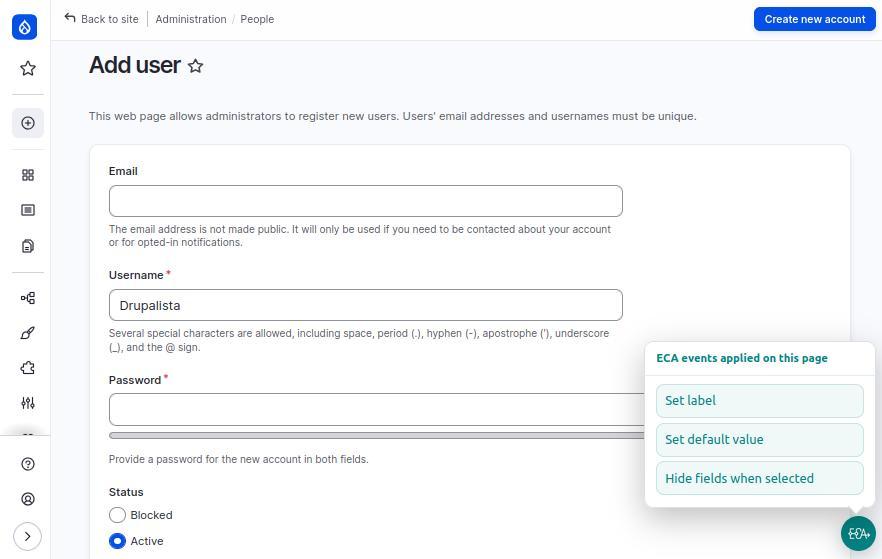
The workflow:
- Enable recording temporarily
- Navigate normally
- Widget appears when ECA processes events
- Click widget, pick event
- Modeler opens with execution loaded
- Replay and debug in context
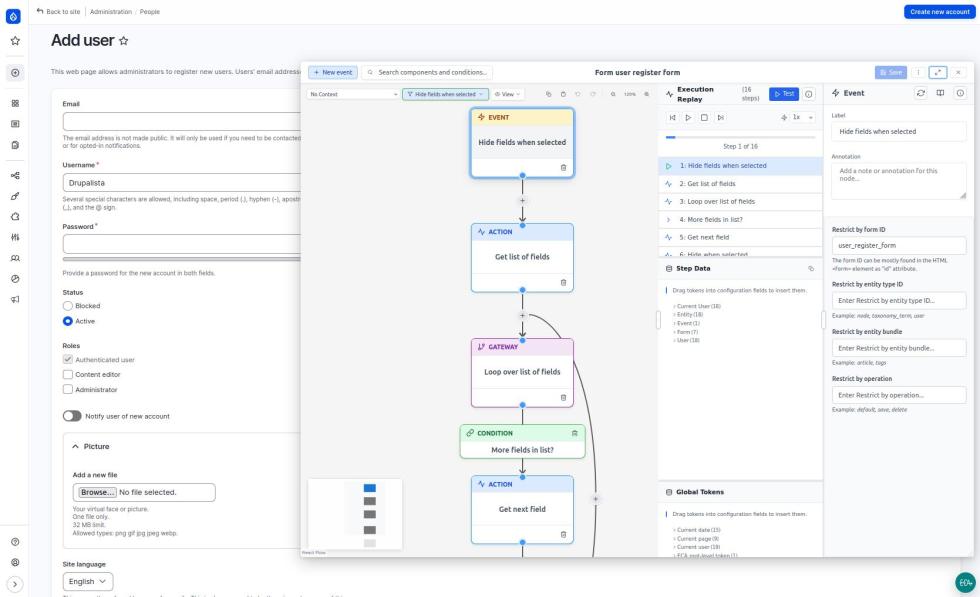
No tab switching, no manual reproduction. You experienced something. Debug it immediately with actual data.
Use cases:
- "Why didn't my form submission trigger notification?" → Submit, widget appears, see what happened
- "Page loads slowly as admin." → Load page, widget shows three ECA workflows, replay each to find the slow one
- "Something's wrong with checkout." → Go through checkout, widget tracks every step, replay with exact cart state
In-context debugging. Insight where action happened.
Conditional Recording (Coming)
I'm getting ahead of myself - this is a feature request. But since you're reading about test/replay, here's where we're heading.
Configure workflows to record when conditions occur: "Record all Commerce orders over $1,000" or "record anonymous form submissions."
System captures full context when triggered. Colleague reports a bug, clicks "Record," triggers it. You load the execution, replay it, see exactly what they saw.
Collaborative debugging. Different developers, same server data, same execution.
Infrastructure exists - we replay events today. Missing: automatic conditional triggers. Coming soon.
Further ahead: Export executions as JSON for staging/dev environments. Download a production failure, replay locally without production database access. Foundation exists, feature doesn't yet.
When it does: Use selectively. Recording is expensive despite optimization (70% CPU savings, 85% storage savings). Enable temporarily, disable after. Never permanent on production.
Real-World Use Cases
Test Before Deploying
Workflow sends notifications when content is published. Three different notifications by content type.
Before deployment, test each type: Article, Page, Event. Verify correct email templates. 30 seconds per test. Catch two bugs. Production launch clean.
Time saved: Hours of post-deployment debugging avoided.
Debug with Recorded Data
Commerce order workflow fails intermittently with specific product combinations. Can't reproduce it.
Enable recording. Next failure captures execution data. Load in modeler, step through. Node 12: workflow expects custom field that only exists on certain products. Missing field crashes workflow.
Add condition: "Check if field exists." Test. Works. Fix model in modeler. Save. Done in seconds.
Time saved: Days of reproduction attempts, guesswork, speculative fixes.
Understand Complex Workflows
Inherit project with 40-node workflow. Structure makes sense on paper. Don't understand behavior.
Trigger test event. Watch execution. See branches, conditions, loops. Five minutes of watching beats an hour of reading.
Learning accelerated: Visual execution is intuitive.
Verify Token Availability
Workflow chains multiple operations. Step 3 needs Step 1 data. Is the token still available?
Run test. Pause at Step 3. Open inspector. Token is there, nested differently than expected. Adjust reference. Test. Works.
Confidence gained: No token guesswork.
How It Works
Modeler API provides test and replay infrastructure. Any Model Owner plugin (ECA, Migrations, future tools) gets this automatically.
Architecture
Test execution:
- User clicks "Test" in modeler
- Modeler enters listening mode, waiting for an event to be dispatched
- User triggers the event (submits form, creates content, etc.)
- When ECA processes the event, execution is tracked: timing, success/failure, token state
- Execution data is captured and sent to the modeler
- Modeler automatically loads and visualizes the results
Recording:
- Real event triggers workflow execution
- If recording is enabled for this workflow/event, system captures full context
- Context serialized with all token values, entity state, user context
- Stored in database
- Can be loaded later for replay from any browser
Replay:
- User opens modeler and loads a recorded execution from the database
- System reconstructs the event context
- Steps through the workflow with playback controls
- User can pause, step, inspect at any point
- Different browsers can replay the same execution data
Token Inspection
System maintains "token snapshot" at each step: available tokens, resolved values, data types, metadata. Modeler fetches at each pause/step, displays in inspection panel.
Performance
Recording is expensive: CPU cycles and storage. Full context capture creates overhead.
We've prioritized optimization. 70% CPU savings one round, 85% storage reduction another. Fundamental cost remains: complete capture requires resources.
Rule: never enable permanently on production. Temporary only. Diagnostic tool, not monitoring.
Test/replay adds overhead but designed for dev environments where acceptable.
Workflow Modeler Only
Test, replay, and debug are in the new Workflow Modeler. Not in BPMN.iO. Unsure if we'll add there.
Workflow Modeler was built with execution visibility in mind. Part of why we built it.
Leading Edge
No other workflow tool in any CMS does this.
WordPress automation? No integrated test/replay.
Joomla workflows? No execution visibility.
n8n or Zapier? Test modes exist, but not step-through replay with production recordings.
Drupal ECA has capabilities dedicated SaaS platforms don't offer.
Not incremental improvement. Leading the industry in workflow developer experience.
Existing users: "This is what we've been waiting for."
What's Next
Test and replay work. Not done yet.
Automatic conditional recording: Rules like "record all Commerce orders over $1,000" capture automatically. No manual triggering.
JSON export/import: Download production failure as JSON, load in staging/local, replay there. Debug without production database access.
Better UX: Working with Emma Horrell and Mark Dodgson to make test, record, replay more intuitive.
Foundation solid. Improvements make it more powerful and accessible.
Getting Started
Site builders: Build workflows. Click "Test" before deploying. Watch execution, inspect tokens, catch bugs early.
Developers: Test mode for complex token logic. Record production events. Share recordings. Build faster with immediate feedback.
Agencies: Test thoroughly before launch. Debug with confidence. Reduce support calls. Faster delivery, higher quality.
Why This Required Investment
Testing infrastructure isn't glamorous. Invisible when it works. Users see "it works," not the complexity.
Required serious investment: architecture to capture full context, smooth playback controls, performance optimization, intuitive UI, comprehensive tests for the testing system itself.
Infrastructure-level work. Compounds over years. Every workflow benefits.
Sustained funding enables deep, foundational work. Not just features - invisible infrastructure that makes features excellent.
Conclusion
For years, building workflows meant working blind. Configure, deploy, hope, debug. Slow iteration, token guesswork, impossible bug reproduction.
Not anymore.
Test live. Replay production events step-by-step. Inspect token values. Close the feedback loop.
What existing ECA users waited for. Drupal leading the industry in workflow developer experience.
Try it. Test workflows. Record executions. Debug with confidence.
Edge cases or improvement ideas? Join Drupal Slack #eca-next-gen. This infrastructure keeps improving with community feedback.
Add new comment