
The New Workflow Modeler: Revolutionary, Not Just Improved
BPMN.iO served ECA well for years. But the community needed something different - not better, different. Six weeks in early 2026, we built it.
Not a prototype. Not incremental improvements. A complete rewrite. React 18 + TypeScript, infinite canvas, execution replay, live testing, four export formats. Standalone embeddable viewer, WCAG AA accessibility, dark mode.
Around 87,000 lines of code. More than 3,400 test cases. About 2.1x as much test code as production code - production-ready and shipped.
This is the story of what we built, how we built it, and why it matters.
Why a New Modeler?
BPMN.iO was ECA's visual canvas modeler for years - drag-and-drop, connect nodes, configure properties. It worked. It served the community well. But it had limitations. The UI wasn't modern. The learning curve was steep for new users. Token handling confused people. The codebase was hard to extend.
We needed something different - not better or worse, different. A modeler with different strengths for different workflows. Something built for ECA's needs from the ground up.
The Modeler API (covered in Post 2) made this possible. Model owners and modelers are decoupled. Multiple modelers can coexist. Models are portable between them. BPMN.iO and the new Workflow Modeler both implement the same API - they work with the same models.
Users get choice. Different tools for different tasks. Both modelers continue to serve the community.
The Decision: Built from Scratch
This didn't come out of nowhere.
October 2025: ECA appears in the DriesNote at DrupalCon Vienna. Shortly after, Emma Horrell, Mark Dodgson, and Lauri Timmanee reach out with UX research and user testing. Their message: don't just improve, transform. Around Christmas, the in-context customization breakthrough lands - bring automation to where users already are. (Post 1 covers this journey in detail.)
By early January 2026, we had experimental code from November and December. Vanilla JavaScript. A 0.1.x branch, testing ideas. Nothing production-ready. Just exploration.
We didn't know how to approach the real project.
Then Lauri made two suggestions that changed everything. First: use React Flow. It handles the canvas, node orchestration, performance. Second: try AI-assisted development. I'd never used AI for anything serious before.
Both suggestions worked. Better than I expected.
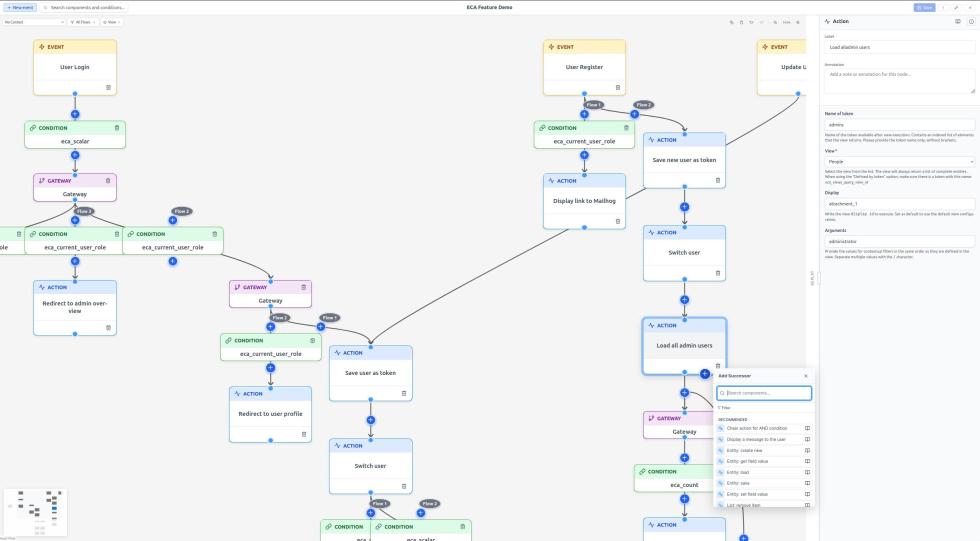
January 2026: the real build started. React 18 + TypeScript strict mode. React Flow managing the visual infrastructure. AI helping write components, tests, documentation. Six weeks of focused development. Git shows the story: 97 commits in January, 185 in February. 282 of the project's 373 total commits happened in those two months.
Why so fast? React Flow solved hard problems we didn't have to rebuild. AI kept velocity high - write a component, generate tests, refactor, repeat. The combination worked.
Core build complete by late February. Everything since then has been regular maintenance - fixes, refinements, polish.
The Technology Stack
Built on React 18 with TypeScript strict mode, React Flow for canvas orchestration, and esbuild for bundling. Quality infrastructure includes Jest and React Testing Library for unit tests, Playwright for E2E testing, and Storybook 8 for component development and accessibility testing. Key dependencies: js-yaml for YAML handling, DOMPurify for sanitization, Zustand for state management.
TypeScript strict mode catches errors at compile time. PHPStan level 6 on the Drupal side ensures the backend is equally rigorous.
Key Features: What You Get
Visual Workflow Editing
An infinite canvas. Drag events, conditions, actions, gateways onto it. Connect them with edges. Configure each component through dynamic forms.
Grid snap keeps things aligned. Smart auto-positioning prevents overlaps when you quick-add nodes. The canvas scales to workflows with dozens or hundreds of nodes without performance degradation.
Quick-Add with Dependency Filtering
Hover over a node. A "+" button appears. Click it.
A context-aware popup opens showing valid next steps. Only components that make sense in that context. No invalid options cluttering the interface.
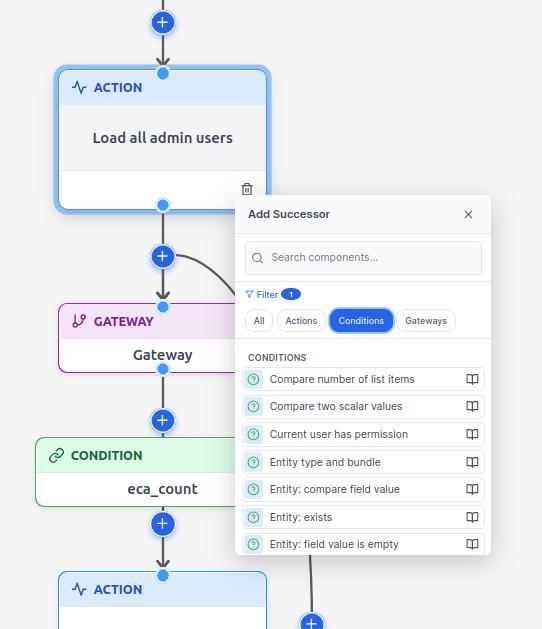
The popup shows all available events, actions, conditions, and gateways - organized in collapsible sections with a type filter. Maintainer-defined favorites appear at the top. The most commonly used components right where you need them.
This is powered by dependency rules. The modeler knows what can follow what. Click the "+" on an event? You see actions and gateways. Click the "+" on an action? You see other actions, gateways, or you're done.
Hover an edge. Add a condition directly to that connection.
Condition-first authoring: select a condition in quick-add, and the modeler creates a placeholder node with that condition pre-attached. Configure the node; the condition is already there.
The interface guides you toward valid structures. You can still break rules if needed, but the default path is correct.
Execution Replay
This changes how you understand workflows.
A workflow executed. Maybe it worked, maybe it failed. Load that execution data into the modeler.
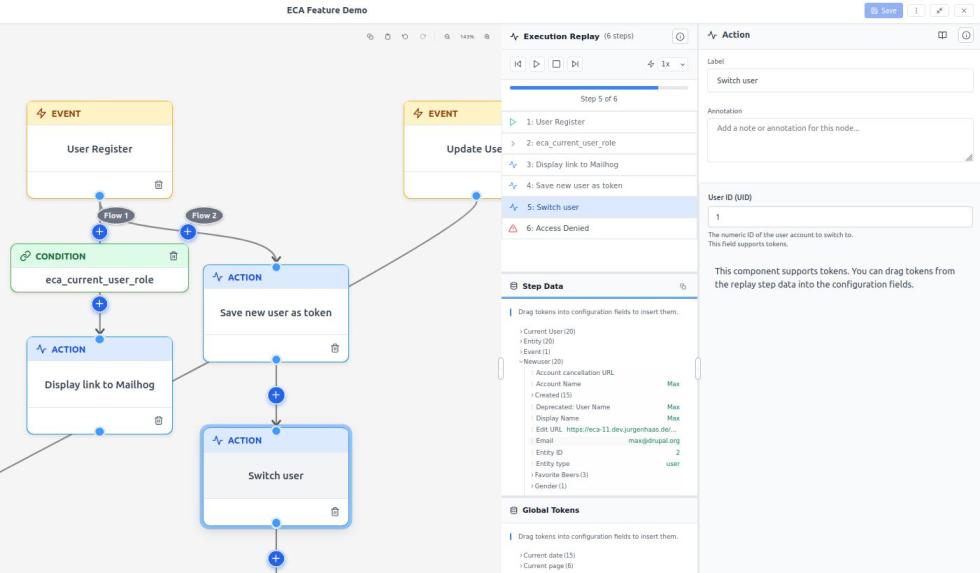
Step through it visually. See which nodes ran. See the token values at each step - real data from that execution. Playback controls: play, pause, adjust speed.
You're not reading logs. You're watching the workflow run, seeing the data flow through it.
Debugging becomes visual. "Why didn't this action fire?" Load the replay. Step to that node. Inspect the tokens. The answer is there.
Live Testing
Build a workflow. Click "Test" in the toolbar.
The modeler waits for the workflow to execute. The backend notifies when it's done. The modeler loads the recorded execution data. Results appear on the canvas - nodes that ran are highlighted, errors are flagged, token values are shown.
No context switching. No separate testing environment. Build, test, iterate - all in one interface.
Four Export Formats
Click Export. Choose your format:
Recipe: A Drupal recipe - the workflow packaged for distribution and installation on other sites.
Archive: Compressed config files - everything needed to import the workflow on other sites.
JSON: Portable model export - loads in the standalone viewer without Drupal.
SVG: Visual snapshot - documentation-ready diagram for presentations or specifications.
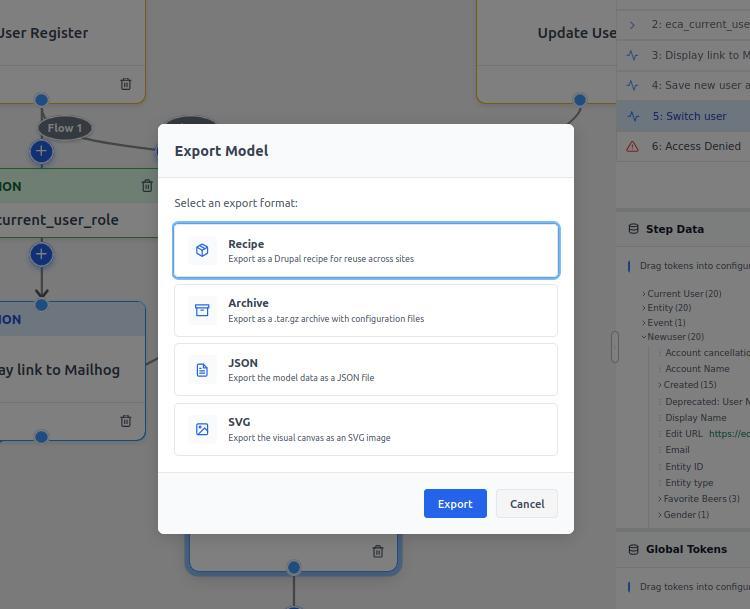
One workflow, four outputs for different use cases.
Standalone Viewer
The modeler ships with a separate, read-only build. Runs in any web page without Drupal.
Export a workflow as JSON. Load it in the viewer. Full visual fidelity. Optional execution replay if you include that data.
Use cases: embed workflows in documentation, share models with stakeholders who don't have Drupal access, include workflows in presentations.
See it in action: the ECA Feature Demo uses the standalone viewer. Documentation and build instructions: Standalone Viewer docs.
Build it with npm run build:standalone. Drop the files on any web server. It just works.
View Modes and UI Flexibility
Fullscreen mode covers the viewport. Resizable floating window mode lets you see the Drupal UI underneath. Drag the window, resize it. Position persists to local storage.
Dark mode: toggle light/dark themes. Persisted per user.
Search: find nodes and edges by label, plugin type, or ID. Live highlighting shows matches. Results dropdown for quick navigation.
Flow filtering: when a model has multiple disconnected event flows, show or hide individual flows to reduce visual clutter.
Annotations
Attach documentation notes to any node or edge. Explain why a condition exists. Document what an action does. Leave breadcrumbs for future maintainers.
Annotations are first-class workflow components. They export and import with the model. Currently they appear in the property panel when you select a node or edge. Based on UX research, we may show them as visible canvas elements in the future.
Undo/Redo
Full undo/redo support. Ctrl+Z / Ctrl+Shift+Z or toolbar buttons. Every canvas change is tracked: moves, adds, deletes, configuration edits.
Built on an event-sourcing pattern. History is reliable. You can experiment without fear - undo is always available.
Keyboard Shortcuts and Accessibility
Full keyboard navigation. Copy/paste. Undo/redo. Delete. Search. Figma-like canvas gestures: mouse wheel to pan, Ctrl+wheel to zoom.
Context-aware: shortcuts disable inside form fields so typing doesn't trigger actions.
WCAG AA accessibility compliance. Screen reader support. Focus management. Live regions for status announcements. Respects reduced-motion and high-contrast preferences. Minimum touch target sizes.
Accessibility tested in CI via Storybook's axe integration. Not an afterthought - it's in the test suite.
Six Granular Permissions
The backend provides six permissions via the Modeler API. The UI enforces them:
- Edit metadata
- Switch context
- Edit templates
- Create templates
- Test workflows
- Replay executions
Granular control over who can do what. Set up roles that fit your team's workflow.
The Numbers: Quality at Scale
The 87,000 lines break down as:
- ~25,900 lines of TypeScript/TSX production source (in
src/, excluding tests and stories) - ~54,400 lines of test code (
tests/+*.test.ts(x)files insrc/) - ~3,130 Jest unit test cases
- ~275 Playwright end-to-end test cases
- 36 Storybook story files documenting and testing components
- ~1,290 lines of PHP for the Drupal integration layer
Test-to-production ratio: about 2.1x. More test code than production code.
This isn't "we wrote tests after the fact." This is test-driven development. Components ship with .stories.tsx files for Storybook and __tests__/*.test.tsx for Jest.
Quality Infrastructure: 15 CI Gates
Every commit runs through around 15 continuous integration gates: build check, linting (ESLint, phpcs, cspell), type checking (TypeScript tsc --noEmit, PHPStan level 6), testing (Jest unit tests with coverage thresholds, Playwright E2E in Chromium, Storybook accessibility with axe), and compatibility (PHPStan against next Drupal minor/major, PHPUnit against previous/next Drupal major and next minor, upgrade status check). A commit doesn't merge unless all gates pass.
TypeScript strict mode: enabled. PHPStan level 6: enforced. Accessibility: tested with axe-core via @storybook/addon-a11y, jest-axe, and axe-playwright.
Architecture: How It's Built
The modeler is a plugin implementation of the Modeler API. Any Drupal module that implements the Modeler API can use this modeler - ECA is the most common model owner, but it's not a hard requirement. The .info.yml explicitly mentions "platforms like ECA, AI Agents, etc."
Internally, the architecture is clean:
State Management: Zustand stores for graph state, selection state, and UI settings. Chosen for TypeScript support and performance.
Orchestrator Pattern: A Flow component coordinates the Toolbar, FlowCanvas, PropertyPanel, and ReplayPanel. Each panel wrapped in a PanelErrorBoundary for isolation.
Flow-Aware Positioning: Detects disconnected flows automatically. Multiple separate event flows lay out cleanly on the canvas without manual intervention.
Security: DOMPurify sanitization for all user-provided labels and annotations. Input validation pipeline.
Event Sourcing: Undo/redo history tracked via an event-sourcing pattern. Reliable, testable, extensible.
Every component follows documented patterns: component development guide, state management guide, accessibility guide, testing guide. Contributors can study these and follow the same patterns. Full development documentation: Modeler Development Docs.
The codebase is reference architecture for Drupal + React integrations.
Multiple Modelers, Model Portability
BPMN.iO and the Workflow Modeler both implement the Modeler API. They work with the same models. A model created in BPMN.iO opens in the Workflow Modeler. A model created in the Workflow Modeler opens in BPMN.iO.
In the model overview table, each model has an operations dropdown. "Edit" opens it in the modeler you used last time. "Edit with..." lets you choose a different modeler.
Switching preserves your work. Stick with the same modeler, and raw positioning data loads - your manual layout stays exactly as you left it. Switch modelers, and the system drops the old raw data (it would be out-of-date after editing), converts the model data upstream, and applies auto-layout. The workflow logic remains intact. Only the canvas positioning resets.
This is choice, not lock-in.
What This Means for Developers
If you're contributing to the modeler or studying it for your own projects, the patterns are documented:
ui/docs/architecture-patterns.md- orchestrator pattern, error boundaries, store structureui/docs/state-management.md- Zustand stores, update patterns, selectorsui/docs/component-development.md- how to add components, Storybook stories, testsui/docs/accessibility.md- WCAG compliance, testing approach, screen reader supportui/docs/e2e-testing.md- Playwright patterns, test builders, fixturesui/docs/security.md- sanitization, validation, secure defaults
Contributions are approachable. Storybook for component dev. Comprehensive test coverage. Clear patterns to follow.
Study the code. Build on the patterns. Submit improvements. The project is open.
What This Means for Site Builders
You get a modern UI that doesn't feel like it's from 2010. Dark mode. Smooth interactions. Visual replay of executions. Keyboard shortcuts that match tools you already use.
Building workflows becomes enjoyable, not frustrating. The interface guides you. Dependency rules prevent common mistakes. Live testing gives immediate feedback.
Accessibility means the tool works for everyone. Screen readers. Keyboard navigation. High-contrast mode. These aren't extras - they're built in.
What This Means for Drupal
Modern JavaScript framework. Comprehensive testing. Accessibility tested in CI. Quality standards that match or exceed commercial SaaS tools. Drupal can build world-class applications.
The test infrastructure - 2.1x more test code than production code - sets a standard. This is how modern Drupal modules should approach quality.
The accessibility approach - Storybook stories with axe-core testing - is reference material. Other projects can learn from it.
6 weeks from decision to production-ready. That timeline is possible when you invest in quality infrastructure. Tests catch regressions. CI enforces standards. Development velocity stays high because the foundation is solid.
Getting Started
Project page: https://www.drupal.org/project/modeler
Documentation: https://project.pages.drupalcode.org/modeler/
Issue queue: https://git.drupalcode.org/project/modeler/-/work_items
GitLab repository: https://git.drupalcode.org/project/modeler
Requirements: Drupal 11.3+ or 12.0+, Modeler API 1.1+.
Install it. Build a workflow. Try execution replay. Export as JSON and load in the standalone viewer. Report what works, what doesn't, what's missing.
Join Us
We're building this in the open. Code contributions, documentation improvements, accessibility testing, UX feedback - all welcome.
Join the conversation on Drupal Slack #eca-next-gen
Next in the series: Post 5 will cover testing, replay, and debugging in depth - closing the feedback loop between building and understanding workflows.
Add new comment