ECA Use Case: Modifying Forms
In my previous post about the value that ECA brings to Drupal in general, and Drupal CMS in particular, I’ve promised to identify specific use cases for ECA and write about them individually. This one explains what ECA can do in the context of forms.
The fact, that this is the first one to publish is not accidentally, it’s because modifying forms in Drupal is by far the number-one reason for creating custom modules. And as such, it’s also the most used set of features that are utilized in ECA.
Full disclosure: for none of the previous statements about form altering being the number-one reason for custom modules and usage in ECA is there any telemetry available. These statements come from our own experience as a Drupal agency and from listening to other Drupalists and the support requests in the ECA issue queue or in Slack.
The desire to modify forms
Foremost, forms on websites are often the sole method to interact with visitors of the site. And they allow websites to collect data from their visitors. That’s to say, if a website in not a one-way communication, forms are irreplaceable means to turn this into a bidirectional data exchange.
In Drupal, forms are everywhere. The search form, the user-login form, a contact form, newsletter subscriptions, content editing, and site configuration forms are just a few examples of what’s accomplished with forms. And Drupal even has a Form API, which is probably a bit behind regarding architectural standards, but it exists and is widely used.
Not just that, Drupal has a built-in mechanism to modify forms, whether they are provided by Drupal core, or any of the contribution modules that are likely to be installed on each Drupal site. What used to be hooks in the past, gets turned into events more recently. For the user or developer who wants to modify forms, that makes no difference. What matters, though, what can be modified in the “life-cycle” of a form:
- Delivering a form to the browser (there are multiple phases for building a form and finally rendering it)
- Validating the submitted data
- Processing the submitted data, if validation succeeded
With this background, let’s digest what’s likely to be modified. And the following list, while comprehensive, is far from being complete. There is really a lot.
- The form title
- Labels, descriptions, and placeholder text of form fields
- Even field widgets could be changed, e.g. use checkboxes instead of select lists
- Hide, add, or group fields
- Only show some fields when certain conditions apply, e.g. if other fields have specific values
- Add additional components, e.g. a block with instructions, to the form, or remove any that are already available
- Change the order of fields
- Add interactive form behaviour, e.g. updating the options in a select list depending upon another field value
- Add, remove, or modify validation constraints on any field
- Define additional processes that should be executed after the form has been submitted
- and so much more
The fact that Drupal allows the user and developer to do all that, is not a matter of course. In so many other systems, this is tedious, and you easily can get yourself into trouble. Not so with Drupal. It doesn’t just make it possible, it still provides powerful means to still keep the process with user created content secure and reliable. We should all be grateful for that.
And before we get into the weeds on how to modify forms, I need to mention that there are forms defined by Drupal core and contributed modules in PHP code. That’s not to say this is the only way to define forms. There is the very famous and astonishing Webform module from Jacob Rockowitz which even allows the user to define form visually in the browser, without having to write any PHP code. And there are, or will be, other ways to define forms as well. Having said that, the following ways to modify forms apply to all of them. Isn’t that great?
How a user can modify forms
This needs to be broken down into 3 different ways of doing this: the past, present, and future. Although, there’s no exclusivity for each of them. What’s the present way of doing things for most, may be already be the past way for some. So, let’s have a look.
Modifying forms with PHP code
This is how things have been done in the past, and of course often still today. A site owner would either learn PHP and the Drupal APIs, or hire somebody to do it for them. And here is how that looks like.
function hook_form_alter(&$form, \Drupal\Core\Form\FormStateInterface $form_state, $form_id): void {
  if (isset($form['type']) && $form['type']['#value'] . '_node_settings' == $form_id) {
    $upload_enabled_types = \Drupal::config('my_module.settings')->get('upload_enabled_types');
    $form['workflow']['upload_' . $form['type']['#value']] = [
      '#type' => 'radios',
      '#title' => t('Attachments'),
      '#default_value' => in_array($form['type']['#value'], $upload_enabled_types) ? 1 : 0,
      '#options' => [t('Disabled'), t('Enabled')],
    ];
    // Add a custom submit handler to save the array of types back to the config
    // file.
    $form['actions']['submit']['#submit'][] = 'my_module_upload_enabled_types_submit';
  }
}
This example is just about adding an extra field with radio buttons to a settings form. What’s also required is to create a module with extra boilerplate and additional files. This module then needs to be installed and enabled, and not to forget, that code needs to be maintained for the time to come.
For most Drupal users, that’s just not an option. At least, nothing they can accomplish themselves. At the same time, it remains true and remarkable that Drupal even allows that to happen in a well-defined environment.
Modifying forms with ECA
This example does the same thing as the one before in PHP. The model is stored as configuration, so there is no module to be created, installed, enabled, or maintained. Well, yes, ECA has to be installed and enabled on the site. But that’s maintained by the Drupal community, and once available, can also be used in the same way for all the other things on the same site.
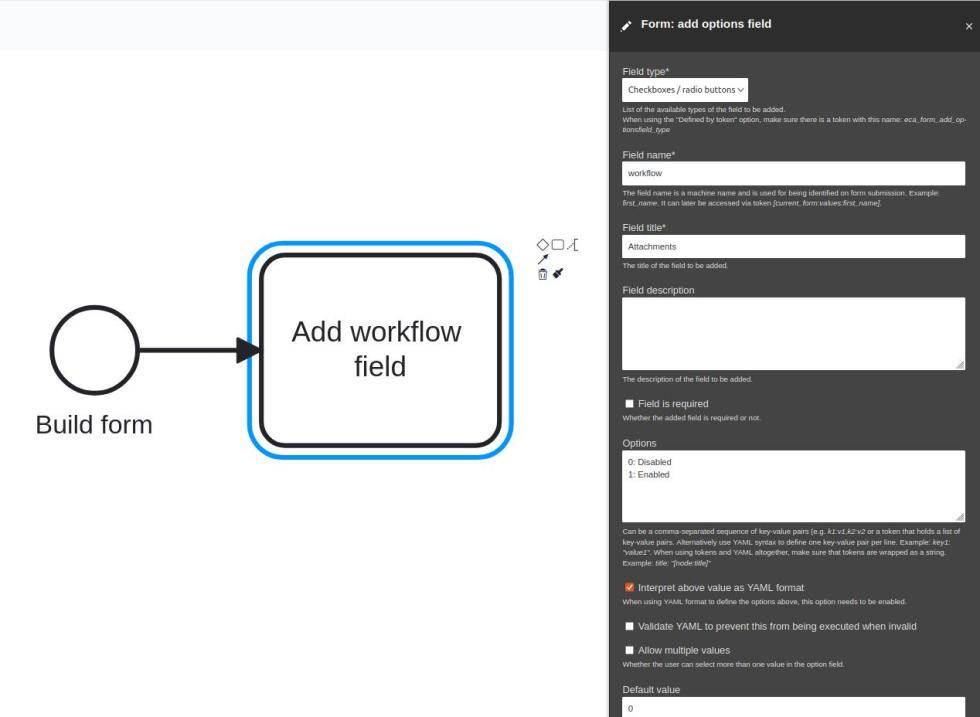
However, there are still pain points that we can’t hide:
- The user needs to know about ECA and where to find it in the pretty large menu tree of admin items
- When the user builds such a model today, they get started with a blank canvas. This can be horrifying: “OMG, what am I supposed to do here?”
- It needs knowledge about Drupal works; otherwise a regular user has no chance to make the right decisions.
- Should they have found out which 2 building blocks are required, they still need to configure e.g. the event such that it takes action on the correct form, and not on all forms.
- To test everything out, the user needs to jump around between the ECA model and the form itself.
If that sounds distressing, then you start getting an idea how your Drupal developers may feel from time to time. But in reality, most of us actually enjoy that, not only because it’s pretty astonishing to see this in action when everything works as required. It’s also great to know that things like this can be done, and you don’t always have to go back to a vendor, asking (and paying) them to do seemingly trivial things for you.
Still, we have to admit, that this interface with all the identified pain points is not yet ideal. And in Drupal world, we always want to do better.
Imagine ECA’s UI for future form modifications
Let the user modify the form they’re currently working with. Like in the above screenshot, users will find extra widgets that let them e.g. add a field to this form with ECA. Right in place where they’re currently working on. Using the (not yet available) widget to add a field, the ECA canvas will be opened in an overlay, already preconfigured with everything that’s known from the context. That means, the event will already be in the canvas, and properly configured for that form that the user is coming from. Also, the action to add a field will be available too, and the user only needs to configure that accordingly. And even that final step is subject to research on how that can be made more intuitive.
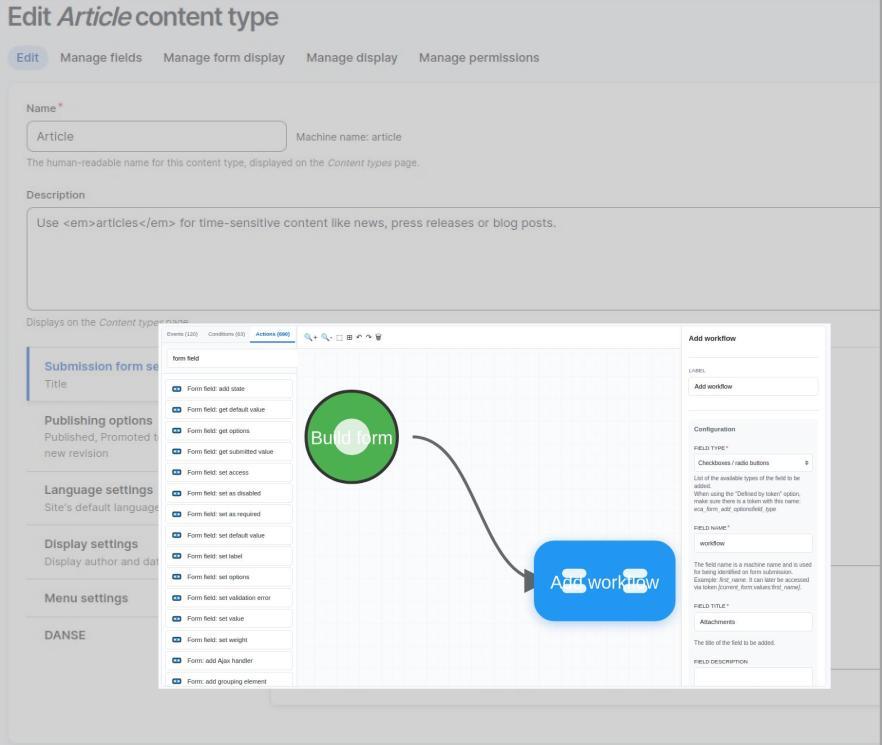
The entire ECA UI in that context will be tailored towards that specific context. That means, that no longer a thousand events, conditions, and actions will be visible, causing headaches to the user as they can’t find the relevant ones. Instead, ECA can just show those that are likely to be required in this context.
And when the modification is completed, the user can just close the overlay, and reloading the modified form, which is still there in the background.
This same interaction will be available for all form related modifications, not just to add an extra field like in the above example. With this improvement, 90% of the identified pain points will be eliminated for form modifications. And while we’re on our way to get there, who knows, we may even get to the remaining 10% as well.
Outlook
This series of blog posts will be continued, and address other typical use cases for ECA all around Drupal in a similar fashion. Do you like that, and want to get involved? Join us in Drupal Slack, or comment below, or send us messages using the contact form. We’d love to hear back.
Añadir nuevo comentario