
ECA Use Case: Authentication
The third edition of ECA use cases will be talking about processes around authentication, including the account creation form, potential redirects, role assignments, and more. Previous issues have been talking about Forms in Drupal or about Notifications. If you missed the initial article that set the context for all this, you’ll find it in ECA brings great value to Drupal CMS, and still has to improve.
As we’re looking for famous use cases for ECA, it doesn’t take long to come across the area around authentication. User accounts need to be created, notifications should be sent out, the login form including what’s happening after successful login, but also dealing with requests for restricted content, or verification of user profile data, all of which fall into this category. And again, if we sit back and try to capture the full picture of the topic, the surprise is once more on Drupal’s side on how many things should be considered to make this a convenient journey for site builders, visitors, and authenticated users.
Please, fasten your seat belts, we’re going to run through this essential area together and find out how easily ECA can get it right for each Drupal site without too much effort.
Access denied, a simple one, right?
Without paying much attention, it’s incredible how quickly this can go wrong. Here is an anecdote on what happened when Drupal CMS was developed last year. The initial approach had been to integrate the Redirect 403 to User Login module. Not only is this a solid solution to redirect browser requests to the user login form when they try to access a page that requires users to be authenticated, it’s also pretty famous, and can be found on almost 30.000 Drupal sites.
However, as ECA had already been part of Drupal CMS, we suggested the use of an ECA model that does the same thing, and wouldn’t introduce yet another dependency. We thought, that was a good idea, until a Drupal core maintainer came along and told us, that there is a core feature that does the same, and is even more performant. You can configure the “Default 403 (access denied) page” in the basic site settings to go to /user/login, and Drupal does that even without a redirect, and forwards the user to the originally requested page after successful authentication.
Well, great. Done deal. But wait. It turns out, there’s more to it. You may not always want to expose, that the restricted page even exists, and instead redirect anonymous visitors to a “404 (page not found)” response. Or, even more impactful, what about restricted pages for authenticated users? Like a dashboard for managers that users without that role shouldn’t see. With the approach in Drupal core or in a module, such requests would also be redirected to the login page, which shows the user profile page instead. But that’s confusing, isn’t it?
With a carefully crafted ECA model, you can get the best of all approaches, and build all the required conditions into the flow so that every possible scenario is being dealt with.
But how about the best UX? Instead of letting every site builder create their own ECA model for this, we should build it for them, make it available as a recipe, and let them discover and apply it through the project browser. And afterwards, review if we can do even better than that by e.g. exposing that background magic at appropriate places in the admin UI of the Drupal site, where those models a related, and probably expected by users.
The user registration form
I bet, most readers are convinced, that’s a non-issue. But we had to learn otherwise. Let’s just look into the onboarding of new users, usually done by privileged users like admins. By default, the form to add a new user account expects the email, the username, a password, and a few other fields depending on what other modules are enabled.
And there is a checkbox, turned off by default, whether the new user should be informed about their account, sending them a link so that they know where to go. So, what’s wrong with that, you ask?
Well, pretty obvious, but we all got so much used to this, that it didn’t get fixed yet. If the new user gets informed about their new account, the email contains a one-time-login link which automatically authenticates them and let them set their password. So far so good, but why had the manager set and repeat a (hopefully random) password in the first place when they created that account? It’s just useless, and it takes extra time, it’s annoying, and potentially insecure if an unsafe password gets used.
The solution is simple, and ECA does that with a simple model: hide the password field in the registration form, if the checkbox to inform the user is being selected.
But we got bit by the devil’s detail here. If the site owner later allows users to register themselves, the same ECA model takes action and hides the password field as well. To be honest, that’s inconvenient, and we had to fix that by telling ECA to only execute that model for authenticated users.
The same question, as above, also applies here: how should such a feature be delivered and exposed to Drupal sites. And how can the UX be improved such that site builders know it exists, and how they can customize it to meet their own requirements.
Post login actions
My personal favourite around user authentication is all the magic that can be applied so that users on Drupal sites will be excited when they log in. There is the ECA Feature Demo that can be downloaded from the ECA Guide.
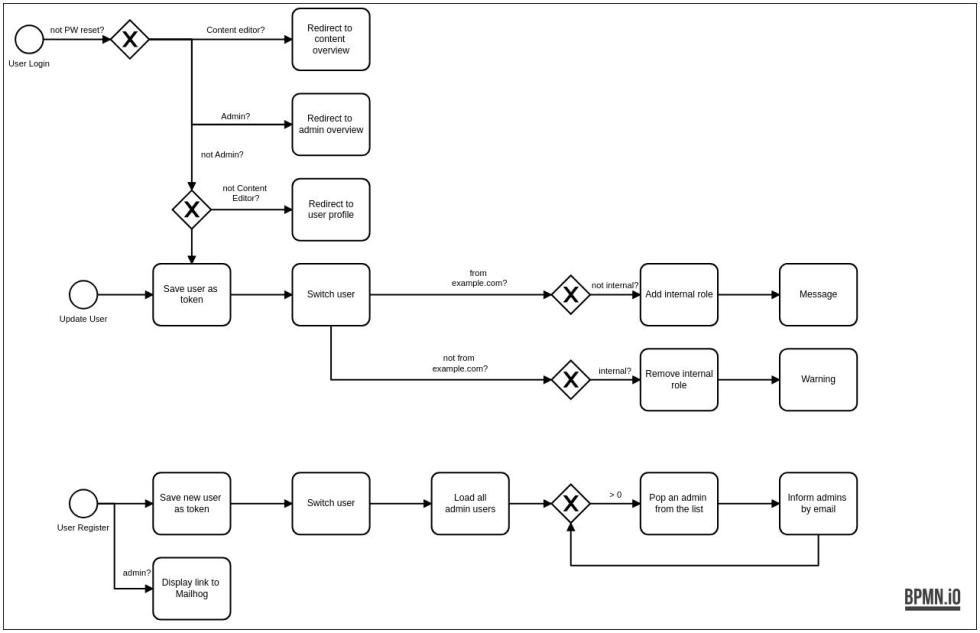
It does a few things, and still remains fairly simple:
- After login, redirect the user to a page that best meets their needs:
- Content editors get redirected to the content list
- Admins get redirected to the admin dashboard
- All others get redirected to their user profile
- But don’t enforce those redirects, if:
- the login is part of a password reset process
- the URL contains a destination
- In addition to the contextual redirect, the model also verifies the domain of the user’s email address and either adds or removes an internal role from their account. This also happens when a user entity get updated, as the email address could have been changed by that
- What’s not yet in the sample model, but can be added easily, is to verify other user profile fields and make certain adjustments to either their user account or other parts of the Drupal site, all depending upon your business rules
- The bottom part of the model finally send a notification email to all admin users if a new user gets registered on the site
Of course, there are modules available for all of those tasks that I’ve just described. But with an ECA model like this, you get numerous extra benefits:
- It’s easy to tailor the behaviour to exactly meet your requirements
- There is a simple model as a config entity, no overhead included
- Fewer dependencies that need to be taken care of
- Easier upgrade paths for the next minor and major Drupal core updates
- Self-documenting configuration that always explain what’s going on
And yet, ECA is not yet available for everybody. It’s difficult to find, not intuitive to use, and requires significant knowledge about how Drupal works. On the other hand, for most people it’s more accessible than writing PHP code instead. That said, we are in the process of analysing all those pain points, and designing solutions that break down those barriers. You want to be part of this and help us to move faster, then please join us in Drupal Slack, or comment below, or send us messages using the contact form. We’d love to hear back.
Añadir nuevo comentario